













Quick Answer: SSD read speed measures how quickly a drive retrieves stored data, while write speed measures how quickly it saves data. Read speed affects tasks such as opening applications and loading files; write speed matters when installing software, copying files, and saving projects. To compare SSDs accurately, look at both sequential and random performance instead of relying on a single maximum MB/s figure.
An SSD may have a higher advertised read speed than write speed. This is normal: the two figures measure different operations, and the difference becomes more noticeable in certain workloads.
1. What Is SSD Read Speed?
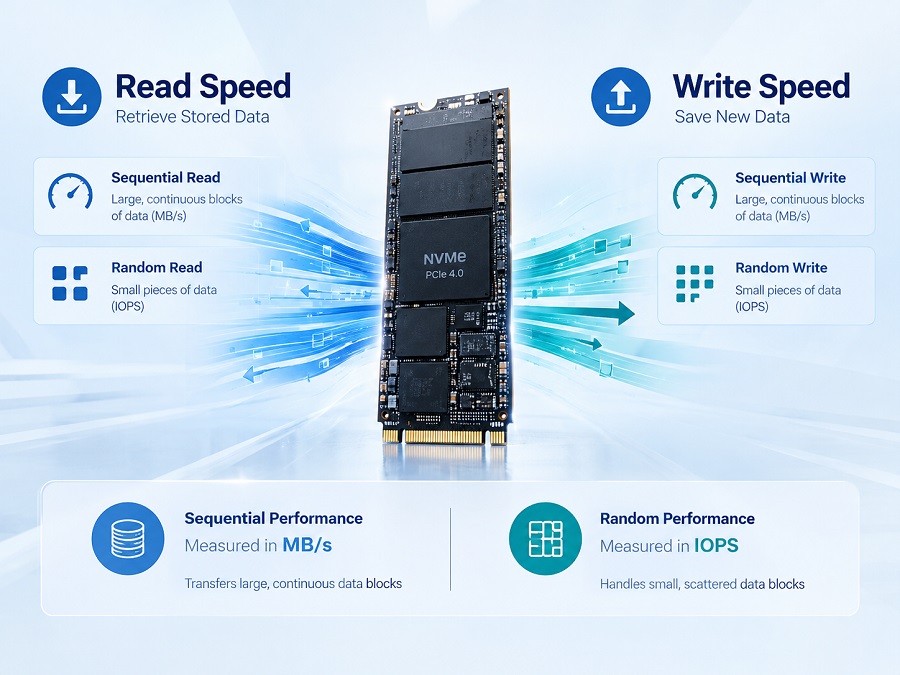
SSD read speed describes how quickly a drive retrieves stored data. It can affect boot times, application loading, file access, and other tasks that involve reading information from storage.
Read performance is commonly measured in two ways:
- Sequential read speed: Measures how quickly a drive reads large, continuous blocks of data. It is useful for transferring large files and accessing large media files.
- Random read performance: Measures how efficiently a drive retrieves smaller pieces of data from different locations. This is relevant to operating systems, applications, and workloads involving many small files.
Sequential read speed is usually reported in MB/s (megabytes per second), while random performance is often measured in IOPS (input/output operations per second).
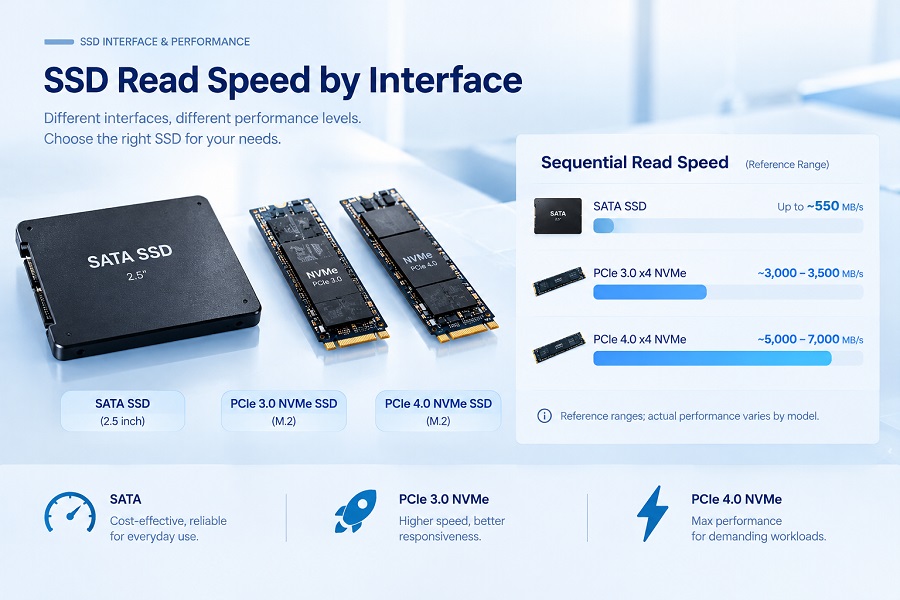
For example, an SSD rated at 3,500 MB/s sequential read can transfer large files much faster than a SATA SSD rated at around 550 MB/s. However, applications will not necessarily open proportionally faster. CPU performance, memory, software behavior, and the type of storage access also affect the result.
2. What Is SSD Write Speed?
SSD write speed measures how quickly a drive saves data. It matters when installing applications, copying files to the drive, downloading large files, and saving or exporting projects.
Write performance also includes two main categories:
- Sequential write speed: Measures how quickly an SSD writes large, continuous blocks of data. It is particularly relevant to large file transfers.
- Random write performance: Measures how efficiently the drive handles small writes across different locations. It can matter when applications frequently update files or write small amounts of data.
Read and write speeds do not have to match. The two operations place different demands on the SSD controller and NAND flash memory, so their results depend on the drive's design, firmware, capacity, and operating conditions.
Write speed can also change during a long transfer. Some SSDs use an SLC cache to improve short-term write performance. When the cache is exhausted, write speed may decrease, particularly during large, continuous transfers. The extent of this change depends on the SSD's NAND flash, controller, capacity, firmware, and operating conditions. If sustained write performance matters to your workload, see our guide to SLC cache and SSD write performance.
3. SSD Read Speed vs. Write Speed: Key Differences
| Feature | Read Speed | Write Speed |
|---|---|---|
| What it measures | Retrieving stored data | Saving data |
| Common units | MB/s and IOPS | MB/s and IOPS |
| Typical tasks | Loading applications, opening files, booting | Installing software, copying files, saving projects |
| Sequential performance | Reading large, continuous blocks | Writing large, continuous blocks |
| Random performance | Retrieving small pieces of data | Writing small pieces of data |
| What to check | Sequential read and random read figures | Sequential write, random write, and sustained performance when relevant |
Neither metric is universally more important. A computer used mainly for office work may not need the highest available sequential read speed. A workstation that regularly transfers large files may benefit more from strong read and write throughput.
The right comparison starts with the tasks the drive is expected to handle.
4. Sequential vs. Random Performance: MB/s vs. IOPS
Two SSDs can have similar sequential speeds but behave differently in everyday use. Sequential and random tests measure different types of data access.
| Metric | What It Measures | Where It Helps |
|---|---|---|
| Sequential read/write (MB/s) | Amount of data transferred in large, continuous blocks | Large file transfers and media files |
| Random read/write (IOPS) | Number of input/output operations completed per second | Operating systems, applications, and small-file workloads |
| Latency | Time taken to complete an individual operation | Workloads sensitive to response time |
MB/s and IOPS measure different things. MB/s indicates the volume of data transferred per second, while IOPS counts completed operations. IOPS results also depend on test conditions such as block size, queue depth, and the mix of read and write operations.
When comparing specifications, check that the figures use comparable test conditions. A higher number does not automatically mean a drive will perform better in every situation.
5. How to Compare SSD Read and Write Specifications
When comparing SSD models for a PC build or purchasing project, check four areas.
5.1 Compare Equivalent Performance Figures
Compare sequential read with sequential read, and sequential write with sequential write. Do not compare one SSD's sequential read speed with another SSD's random IOPS figure.
Check whether the published figures represent maximum performance or results measured under specific conditions. Peak specifications are useful for an initial comparison, but they may not reflect performance throughout a long transfer.
5.2 Check the Interface and Protocol
The interface affects an SSD's potential throughput, but actual performance also depends on the drive and the host system.
| SSD Type | Approximate Sequential Read Range | Main Consideration |
|---|---|---|
| 2.5-inch SATA SSD | Up to around 550 MB/s | Suitable for systems with SATA support |
| PCIe 3.0 x4 NVMe SSD | Around 3,000–3,500 MB/s for many models | A common option for NVMe-compatible PCs |
| PCIe 4.0 x4 NVMe SSD | Around 5,000–7,000 MB/s for many models | Higher potential throughput on compatible systems |
These are general reference ranges, not guaranteed results for every SSD. Performance varies by model, capacity, controller, NAND flash, firmware, and test conditions. Check the specifications for the exact model before making a comparison.
For more detail, see our guide to PCIe 4.0 vs. PCIe 3.0 SSDs.
5.3 Confirm Capacity and Compatibility
Different capacities within the same SSD product family may not deliver identical performance. A 256GB model, for example, should not automatically be assumed to have the same write speed as its 1TB counterpart.
Before selecting a drive, confirm that its interface, form factor, capacity, and protocol are supported by the target computer. A faster SSD cannot deliver its full potential if the host system does not support the relevant interface.
5.4 Check Long-Term Requirements
Beyond maximum read and write speeds, some workloads require a closer look at:
- Sustained write performance during long transfers
- Random read and write performance, where relevant
- Endurance ratings and warranty terms
- Compatibility with the intended system
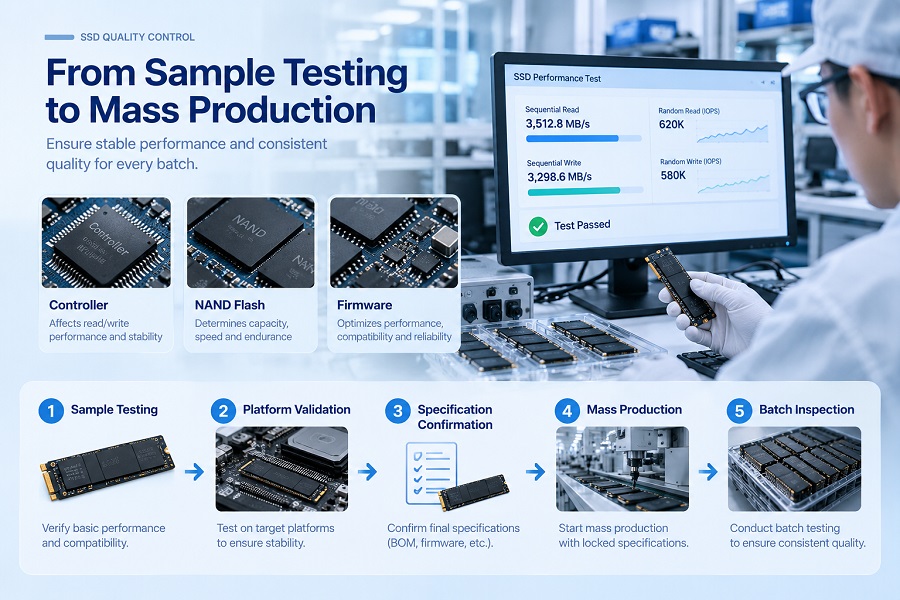
For PC builders, distributors, and OEM customers, sample validation is another important step. Confirm the model and capacity, test the drive in the intended system, and agree on the required specifications before placing a bulk order.
6. Which SSD Specifications Matter for Your Workload?
Different workloads place different demands on storage. Use the table below as a starting point rather than treating it as a strict ranking of SSDs.
| Use Case | What to Prioritize | Why |
|---|---|---|
| Office work and everyday computing | Compatibility, capacity, balanced performance | Routine tasks rarely involve continuous large-file transfers |
| Gaming | Read performance, capacity, system compatibility | Storage can affect loading, but results also depend on the game and the rest of the system |
| Large file transfers | Sequential read and write speeds | Throughput has a direct impact on transfer time |
| Content creation | Read/write performance and sustained writes where relevant | Large project files and repeated writes can place greater demands on storage |
| PC assembly and distribution | Consistent specifications, compatibility, sample validation | These help ensure the drive meets the requirements of the target systems |
For everyday browsing and office work, a compatible SATA SSD may be sufficient. A system that regularly moves large files may benefit from an NVMe SSD with higher sequential throughput.
The goal is to match the drive to the system, workload, and budget—not simply to choose the model with the largest advertised number.
7. Frequently Asked Questions
Is SSD read speed more important than write speed?
Neither is always more important. Read speed affects how quickly stored data can be retrieved, while write speed affects how quickly new data can be saved. Compare both according to the tasks the drive will handle.
Why is my SSD write speed lower than its read speed?
Read and write operations place different demands on an SSD, so their specifications often differ. Write performance can also change with capacity, workload, temperature, and the duration of a transfer.
Is 3,500 MB/s read speed fast for an SSD?
Around 3,500 MB/s is a strong sequential read figure for many PCIe 3.0 x4 NVMe SSDs. Whether it is sufficient depends on the system and workload. Check write speed and compatibility as well.
What is the difference between MB/s and IOPS?
MB/s measures the amount of data transferred per second. IOPS measures the number of input/output operations completed per second. Sequential tests commonly report MB/s, while random-access tests often use IOPS.
Does a higher SSD read speed make a computer faster?
It can help with tasks that rely on reading large amounts of data, but the improvement is not always proportional to the advertised speed difference. CPU performance, memory, software, and workload also affect the result.
What should PC builders check before choosing an SSD supplier?
Confirm the interface, capacity options, read/write specifications, compatibility requirements, warranty terms, and product documentation. For bulk orders, validate samples against the agreed specifications and intended systems before confirming the order.
Conclusion
SSD read and write speeds describe different aspects of storage performance. Sequential MB/s figures help compare large-file transfers, while random IOPS and latency provide additional context for workloads involving many small operations.
Compare equivalent metrics, check interface compatibility, and pay attention to sustained write performance when long transfers are involved. An SSD that matches the system and its intended use is a more practical choice than one selected solely for its highest advertised speed.
About Taimi
Taimi is a consumer-grade SSD and storage manufacturer operated by Shenzhen Minder Semiconductor Co., Ltd. We support PC builders, distributors, and OEM customers with product specification confirmation, sample validation, and bulk purchasing cooperation.
For product specifications or bulk-order discussions, visit Taimi's official website or contact morffin@taimitech.com.
Looking for an SSD Supplier for Your Next Project?
Contact the Taimi team to discuss SSD specifications, sample validation, and bulk purchasing requirements.