













SSD TRIM is a storage command mechanism that allows a compatible operating system to notify a solid-state drive (SSD) that certain logical data blocks are no longer needed. The SSD controller can use this information when managing NAND flash memory and reclaiming storage space.
TRIM can support efficient internal data management, but it does not guarantee an immediate speed increase, instant physical erasure of deleted data, or a specific extension of SSD lifespan. This guide explains how TRIM works, how to check its configuration in Windows, and how to distinguish TRIM-related behavior from other causes of SSD performance changes.
Quick Answer: What Does SSD TRIM Do?
TRIM communicates that specified logical blocks are no longer needed by the file system. A compatible SSD can use this information during garbage collection and other internal flash-management operations.
- Performance: TRIM can help support efficient write behavior, depending on the drive and workload.
- Endurance: It may reduce unnecessary data movement in some workloads, but it does not guarantee a longer lifespan.
- Data deletion: TRIM is not a secure-erasure command and does not guarantee immediate physical erasure.
- Windows check: A system setting shows whether delete notifications are enabled, but it does not prove that every component successfully passes and processes the command.
1. What Is SSD TRIM?
SSD TRIM is a deallocation mechanism that allows a compatible operating system and storage stack to tell an SSD that specified logical block addresses (LBAs) are no longer needed by the file system.
When a user deletes a file, the file system generally marks the associated space as available for reuse. This logical change does not necessarily erase the corresponding NAND flash cells immediately. TRIM communicates that the affected logical blocks no longer need to retain their previous data for the host file system.
The SSD controller can use this information when deciding which data must be preserved and which storage space can be reclaimed. The exact implementation and timing depend on the operating system, storage interface, driver, controller, and firmware.
Why Do SSDs Need TRIM?
NAND flash is programmed in pages and erased in larger blocks. When an SSD needs to reclaim a block, its controller may have to preserve valid data, move it elsewhere, and erase the block before reusing it.
TRIM helps the controller identify data that the host no longer needs. Under suitable conditions, this information can reduce unnecessary data-preservation work during internal block reclamation.
Is TRIM the Same as Secure Erase?
No. TRIM and secure data sanitization serve different purposes.
- TRIM: Communicates that specified logical blocks are no longer needed by the file system.
- Secure sanitization: Uses a supported device or platform procedure designed to make data unrecoverable according to the applicable method and requirements.
Do not rely on TRIM alone to securely erase confidential files before selling, reusing, or decommissioning an SSD. Use a manufacturer-supported sanitization method appropriate to the sensitivity of the data.
2. How Does TRIM Work?
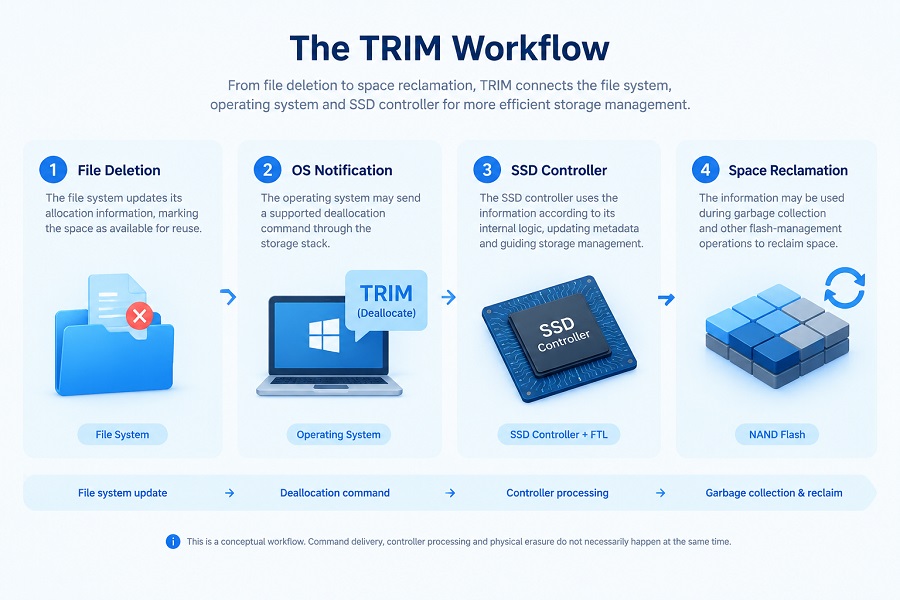
TRIM connects file-system space management with the SSD controller's internal flash-management processes. A simplified workflow has four stages.
The TRIM Workflow
The file system updates its allocation information.
The operating system may send a supported deallocation command through the storage stack.
The SSD controller uses the information according to its internal logic.
The information may be used during garbage collection and other flash-management operations.
Important: This is a conceptual workflow. Command delivery, controller processing, and physical erasure do not necessarily happen at the same time.
What Happens Inside the SSD Controller?
An SSD controller manages the relationship between logical addresses visible to the host and physical locations in NAND flash. This mapping is commonly managed through a Flash Translation Layer (FTL).
When a supported deallocation notification reaches the SSD, the controller can use it to update internal metadata and guide subsequent storage-management decisions. It may then use this information during garbage collection or other operations.
The implementation varies by device. TRIM is best understood as information that supports internal management, not as a guarantee that every controller updates its mapping tables or physically erases NAND in exactly the same way.
For a related explanation, read How SSD Controllers Work.
3. How TRIM Affects SSD Performance
TRIM can help an SSD manage invalid data more efficiently by identifying logical blocks that the host no longer needs. Depending on the drive and workload, this may reduce unnecessary data movement during internal operations.
However, TRIM does not increase an SSD's rated interface bandwidth, and it does not guarantee a measurable improvement in every benchmark. Actual performance also depends on NAND characteristics, controller design, firmware, available space, cache behavior, temperature, and workload.
TRIM and Sustained Write Performance
During block reclamation, an SSD may need to move valid data before erasing a NAND block. Knowing which logical blocks are no longer needed can help the controller avoid preserving some unnecessary data.
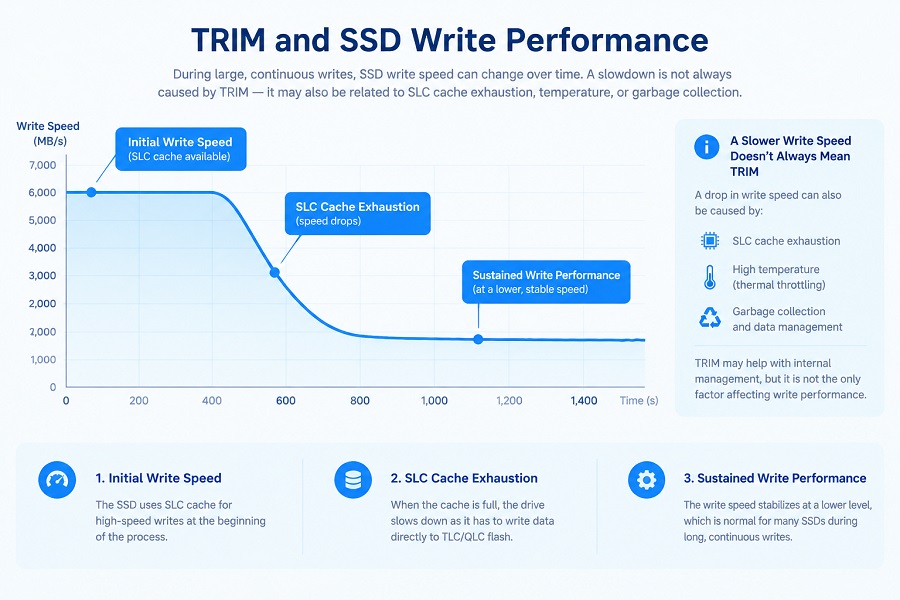
This can support efficient garbage collection and sustained write behavior under some conditions. But if write speed drops during a large file transfer, TRIM is only one possible factor.
| Observed symptom | Possible explanation | What to check |
|---|---|---|
| Fast at first, then slower during a long write | SLC cache exhaustion, sustained NAND write limits, or garbage collection. | Transfer size, slowdown point, and sustained-write behavior. |
| Performance declines as the drive heats up | Thermal throttling may be involved. | Temperature and performance over time. |
| Write behavior changes when the drive is nearly full | Limited free space may increase internal data-management work. | Drive fill level and workload consistency. |
| No clear improvement after deleting files | TRIM may not be the limiting factor, or its effect may not be immediately visible. | OS configuration, connection path, and repeatable test results. |
These are troubleshooting clues, not definitive diagnoses. A single benchmark cannot isolate TRIM, cache behavior, thermal limits, and garbage collection. For a meaningful comparison, keep the test file size, workload, temperature, available space, and connection method as consistent as practical.
Learn more in What Is SLC Cache in an SSD? and Sequential vs. Random SSD Speed.
4. Does TRIM Extend SSD Lifespan?
TRIM can support efficient internal data management, but it does not guarantee a specific increase in SSD lifespan. Endurance depends on the NAND flash, controller, firmware, workload, temperature, and other design factors.
TRIM and Write Amplification
Write Amplification Factor (WAF) describes the relationship between data written internally to NAND flash and data written by the host over the same measurement period.
Write Amplification Factor (WAF)
WAF = NAND Writes ÷ Host Writes
A WAF of 1 means NAND writes equal host writes during the measured period. Actual values depend on workload and measurement method.
When the controller knows which logical blocks are no longer needed, it may avoid moving some data that would otherwise be preserved during garbage collection. Under suitable workloads, this can help reduce unnecessary internal data movement and may contribute to lower write amplification.
TRIM does not guarantee a particular WAF or TBW increase. Internal writes also depend on data placement, garbage-collection policy, over-provisioning, firmware, and host workload.
What Else Affects SSD Endurance?
- NAND characteristics: TLC and QLC designs have different endurance and performance trade-offs, depending on implementation.
- Host write workload: The amount and pattern of data written affect total drive activity.
- Controller and firmware: Wear leveling, error correction, caching, and garbage collection affect internal behavior.
- Over-provisioning: Reserved capacity can provide the controller with additional space for internal management.
- Operating conditions: Temperature and workload patterns can influence device behavior.
For a related explanation, read SSD TBW Explained: What It Means and How It Affects SSD Lifespan.
5. SSD TRIM vs. Garbage Collection
TRIM and garbage collection are related but distinct. TRIM communicates information about logical blocks that are no longer needed by the file system. Garbage collection is an internal SSD process that reclaims NAND blocks and may move valid data before erasing a block.
| Feature | TRIM | Garbage collection |
|---|---|---|
| Primary role | Communicates which logical blocks are no longer needed. | Reclaims NAND blocks for future use. |
| Main control layer | Operating system and storage-command path. | SSD controller and firmware. |
| Immediate physical erasure | Not guaranteed. | May include erasing reclaimed NAND blocks as part of the process. |
| Relationship | Provides information about logical data that is no longer needed. | Can use that information when reclaiming storage space. |
Can Garbage Collection Work Without TRIM?
Yes. Garbage collection is an internal controller function and can operate without TRIM notifications. However, without deallocation information, the controller may not know that some data is no longer needed by the host file system. Depending on the workload and drive design, this can result in additional data movement during block reclamation.
6. How to Check TRIM in Windows
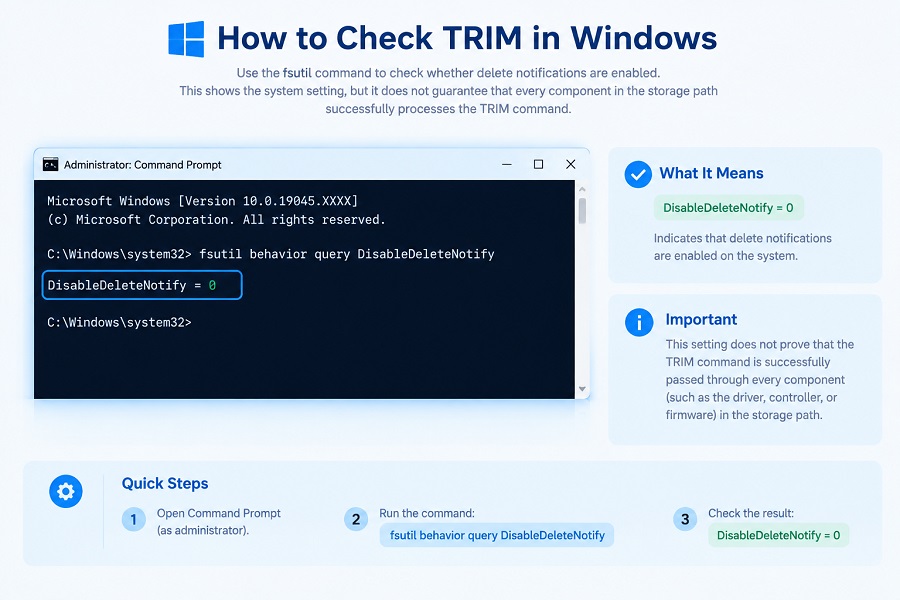
Windows provides a command for checking the file system's delete-notification configuration. It is a useful first step, but it does not independently verify that every component in the storage path passes and processes TRIM successfully.
Step 1: Open Command Prompt as Administrator
Open the Start menu, search for Command Prompt, and select Run as administrator.
Step 2: Run the Command
fsutil behavior query DisableDeleteNotifyStep 3: Interpret the Result
| Reported value | Meaning |
|---|---|
DisableDeleteNotify = 0 |
Delete notifications are enabled for the reported file system. |
DisableDeleteNotify = 1 |
Delete notifications are disabled for the reported file system. |
The command may return separate results for different file systems, such as NTFS and ReFS. Interpret each result according to the file system named in the output.
0 means delete notifications are enabled in the reported configuration. It does not prove that the drive supports TRIM or that every driver, controller, enclosure, and device firmware successfully passes and processes the command. Microsoft notes that unsupported storage devices do not receive TRIM notifications.Official reference: Microsoft Learn — fsutil behavior.
7. TRIM Support in SATA, NVMe, and External SSDs
TRIM and equivalent deallocation mechanisms help SSDs identify logical blocks that are no longer needed. Actual support depends on the storage interface, operating system, driver, controller, and connection path.
SATA SSDs
SATA SSDs can use the ATA Data Set Management command with the TRIM feature to notify the drive that certain logical blocks are no longer needed. The controller can use this information during internal flash management.
NVMe SSDs
NVMe SSDs can use the Dataset Management command with the Deallocate attribute to communicate logical-block deallocation. This does not guarantee immediate physical erasure or a specific performance improvement. Actual behavior depends on device capabilities and the applicable NVMe specification.
For details, see the NVM Express specifications.
External SSDs Connected Through USB
An external SSD may support TRIM or equivalent deallocation functionality, but the USB enclosure, bridge chipset, driver, and operating system can affect whether commands reach the drive.
Do not assume that every USB-connected SSD supports end-to-end TRIM simply because its internal drive supports it.
On Windows, Microsoft's fsutil behavior documentation explains how to check delete-notification settings. These settings alone do not confirm successful command delivery to the SSD.
For a comparison of common internal SSD interfaces, read PCIe vs. SATA SSDs.
8. How to Troubleshoot SSD Write-Speed Drops
If an SSD slows down during a large file transfer, follow a consistent troubleshooting process before concluding that TRIM is the cause.
- Confirm the configuration. Record the SSD model, interface, firmware, driver, and connection method.
- Check available space. Record the approximate drive fill level, since internal data management can vary with available capacity.
- Use a consistent workload. Record the test file size, write pattern, duration, and benchmark tool. Short tests may not reflect sustained-write behavior.
- Monitor temperature. Check whether the slowdown occurs as the drive heats up.
- Investigate cache behavior. Determine whether the transfer may exceed the drive's effective write-cache capacity.
- Check TRIM configuration. Run the Windows command above and investigate storage-path compatibility if there is evidence of a problem.
- Repeat under comparable conditions. Keep workload, temperature, fill level, and connection method as consistent as practical.
How to Interpret the Results
A slowdown after a large transfer may indicate cache exhaustion or a sustained-write limitation. A slowdown that tracks temperature may indicate thermal throttling. Different results at different fill levels may point to changes in internal data management. These patterns help guide further investigation but do not independently establish a diagnosis.
For meaningful comparisons, record the test conditions and repeat the test when possible. Do not use one benchmark result to claim that TRIM is working or failing.
9. SSD TRIM Best Practices
- Use a compatible operating system and storage configuration. Confirm support across the file system, driver, interface, controller, and device.
- Use built-in maintenance features. Follow the operating system's supported drive-optimization practices rather than routinely changing low-level settings.
- Keep reasonable free space available. A nearly full SSD may have less flexibility for internal data management, although the impact varies by drive and workload.
- Evaluate sustained performance. Long transfers and consistent workloads reveal behavior that a short peak-speed benchmark may not show.
- Follow firmware and driver guidance. Use compatible versions recommended for the SSD and platform.
- Use proper sanitization for sensitive data. TRIM is not a replacement for a supported secure-erasure procedure.
For Windows maintenance guidance, see Microsoft's guide to defragmenting and optimizing data drives.
10. Frequently Asked Questions About SSD TRIM
Should TRIM be enabled on an SSD?
For a modern SSD used with a compatible operating system and storage configuration, TRIM support is generally beneficial. Check the operating system's configuration and follow the device manufacturer's recommendations.
Does TRIM make an SSD faster immediately?
Not necessarily. TRIM provides information about logical blocks that are no longer needed. Any performance benefit depends on the drive, firmware, workload, available space, and internal processing.
Does deleting a file immediately erase NAND flash?
No. Deleting a file typically updates the file system. TRIM can notify a supported SSD that associated logical blocks are no longer needed, but it does not guarantee immediate physical erasure of the underlying NAND cells.
Does TRIM extend SSD lifespan?
TRIM can help the SSD controller manage invalid data more efficiently under suitable conditions. Endurance also depends on NAND characteristics, host writes, write amplification, firmware, temperature, and workload.
Is TRIM the same as garbage collection?
No. TRIM communicates information about logical blocks that are no longer needed by the file system. Garbage collection is an internal SSD process that reclaims NAND blocks and may move valid data before erasing a block.
What does DisableDeleteNotify = 0 mean?
For the reported file system, a value of 0 means delete notifications are enabled. It does not prove that the storage device supports TRIM or that every component successfully passes and processes the command.
Does TRIM work on NVMe SSDs?
NVMe SSDs can use Dataset Management with the Deallocate attribute to communicate logical-block deallocation. Actual behavior depends on device capabilities and system support.
Can an external USB SSD support TRIM?
Some external SSD configurations support TRIM or equivalent deallocation functionality. Support depends on the SSD, enclosure or bridge chipset, driver, and connection path.
Conclusion: TRIM Is One Part of SSD Performance Management
SSD TRIM communicates that certain logical blocks are no longer needed by the file system. A compatible SSD can use this information during garbage collection and other internal flash-management operations.
TRIM does not guarantee an immediate performance improvement, secure deletion, or a fixed extension of SSD lifespan. Real-world behavior also depends on SLC cache, NAND characteristics, available space, thermal management, firmware, and workload.
When investigating SSD performance, start with the operating system configuration and storage connection, then compare results under consistent test conditions. This is more reliable than assuming every write-speed drop is caused by TRIM.
Looking for an SSD Manufacturing Partner?
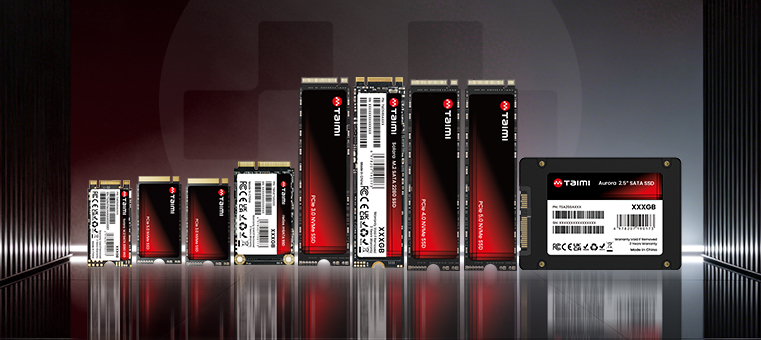
Taimi focuses on consumer-grade SSD products for computer builders, distributors, and OEM projects. When evaluating SSDs for bulk procurement, consider interface compatibility, sustained-write behavior, endurance specifications, firmware requirements, and quality-control processes alongside peak performance.
Contact our team to discuss SSD product options and OEM project requirements for your application.
References and Official Documentation
- Microsoft Learn: fsutil behavior — Windows file-system behavior settings and delete notifications.
- Microsoft Support: Defragment and optimize your data drives in Windows — Windows drive-maintenance guidance.
- NVM Express: Official Specifications — NVMe protocol and command-set documentation.
Author: Taimi Technical Team
Editorial note: This article explains general SSD behavior. Actual TRIM support and performance depend on the operating system, storage interface, driver, controller, firmware, and workload.